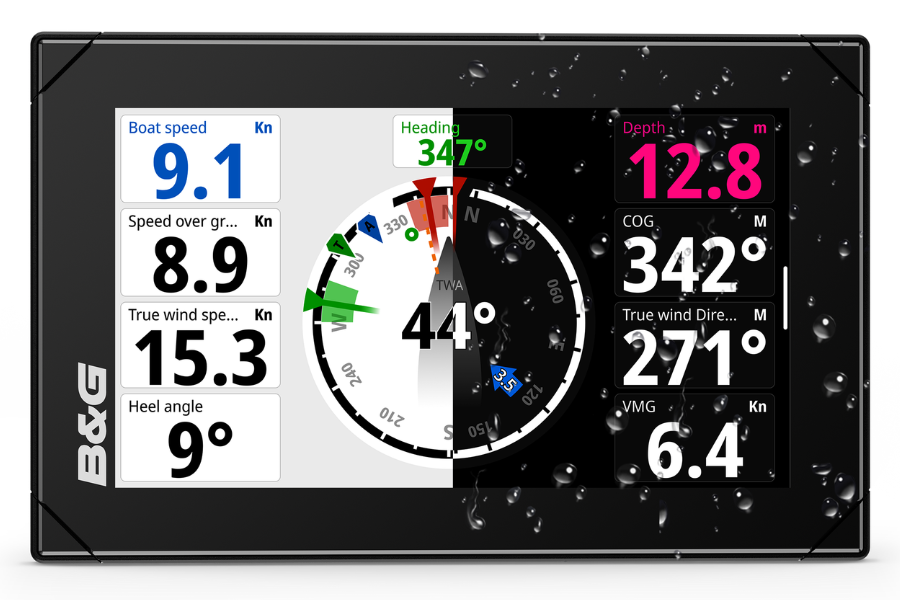
B&G has released software update 2.3.213 for its Nemesis range of instrument displays. It adds autopilot control, new gauge options and closer integration with the rest of the B&G lineup, based on feedback from B&G's professional sailing community and its internal software quality assurance teams.
Nemesis now includes a dedicated autopilot status gauge and dashboard. Automatic dashboard switching means autopilot data appears on screen the moment the system is engaged. Users can also commission a B&G autopilot directly through Nemesis for the first time, rather than through a separate process.
For Grand Prix teams, Nemesis now supports unlimited configurable User Channels from the Hercules WTP Sailing Processor, which B&G says allows near infinite data customisation. New user-configurable Radial and Bar gauge widgets include target values, so crews can track pace or wind targets at a glance. A new Import/Export function lets sailors share or back up their dashboard layouts.
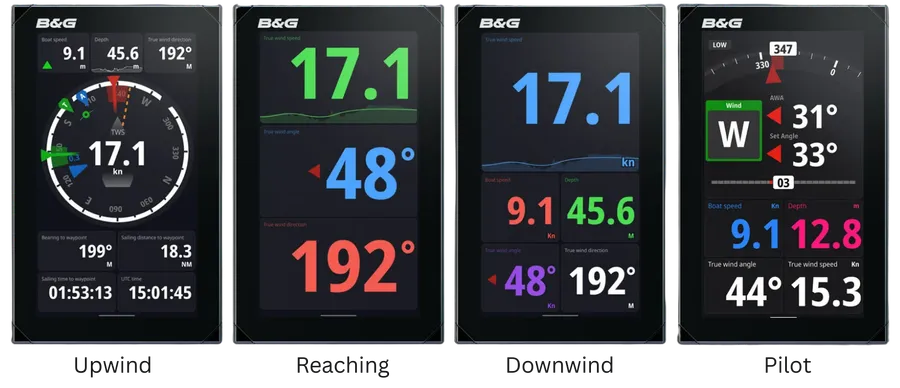
B&G has also made changes aimed at legibility in bright, high-glare conditions on the water. The default display theme has switched to Light, matching B&G chartplotters and improving contrast in direct sunlight. Digit sizes have been increased, and a new XXL caption size is available for data that needs to be read from the mast or the cockpit. Captions can now be aligned left, middle or right to suit a custom dashboard layout. The screen unlock process has also changed, with users able to choose between a short or long swipe, and the update adds full support for Time to Burn and Mast Twist data functions.
Updating a Nemesis display is done over an internet connection. Owners need to connect their display to Wi-Fi or a wired Ethernet connection, then go to Settings, General, Software Update and select Check for Updates. The display will find, download and prepare the new software in the background.